
We spent three months chasing a ghost. Every time we thought we had it figured out, it slipped away, leaving us with the same stuttering UI, albeit with a cleaner and more robust codebase.
This is the story of how we repeatedly failed to solve a performance bug forced us to plow through potential issues which we were able to fix on the way but which again and again would not budge this issue.
What was this performance bug then?
Well, it was a simple as very low frame rate of moving an input field, for making a comment on a social post, up half the screen when opening the mobile keyboard.
For those unfamiliar or just getting started with flutter, one of the ways to diagnose low frame rate issues is to look at widget rebuilds. A widget rebuilds every time it told to do so by your application code or if the flutter framework deems that something in the ui has changed and therefore the widget needs to update its appearance, layout or positioning on the screen.
As you can see, pretty bad...
We started out by analyzing the widget rebuilds on this page and found that they indeed were really high when opening and closing the input field. Makes sense. But why? Its a seemingly simple and standard change of position with no other widgets affected. To understand the cause of the rebuilds we used the Flutter inspector which has a Performance view where you can visualize all widget rebuilds (remembering to check the Track Widget Builds option).
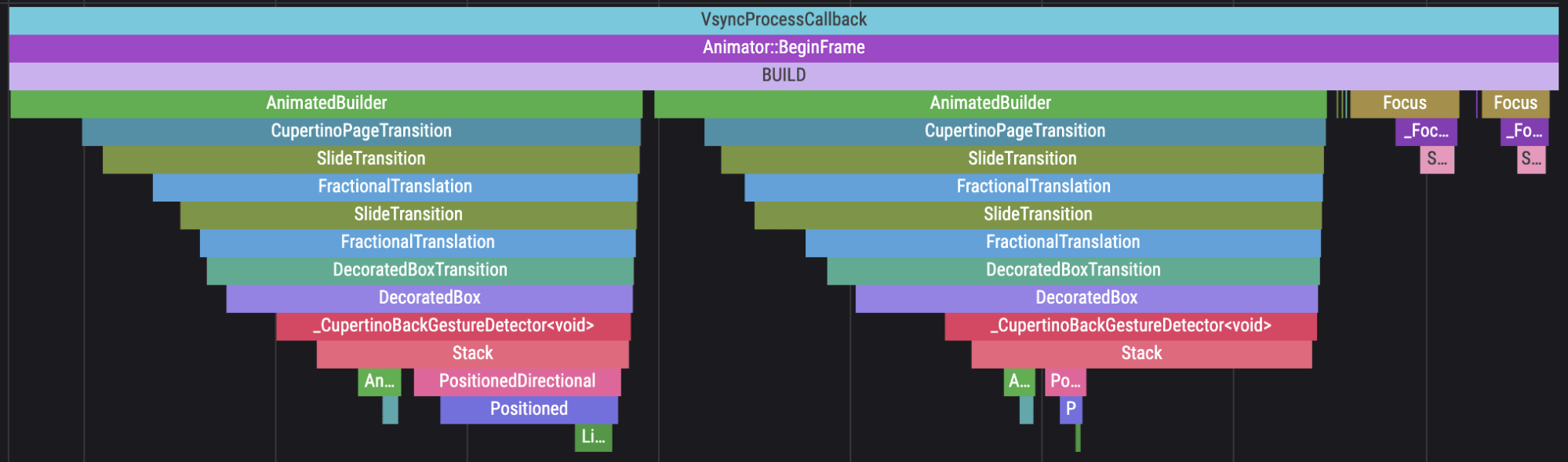 Example widget build visualization
In our app we saw, to our horror, that the whole widget tree (even widgets on parent pages that were not even showing) was rebuilt on every frame until the keyboard had finished its animation. This had us scratching our heads and questioning our very understanding of how Flutter works...
At the time we were using go_router which we were not happy with in general. We had routes as magic strings all over the codebase and had been thinking about finding something better. Our first hypothesis, biased as we already were against go_router was that we were using it incorrectly and so we suspected that when the keyboard resized the top page. go_router was inadvertently telling every parent in the stack to rebuild, which we thought could explain why the whole application was rebuilding. (Tip: If you are looking to reduce widget rebuilds in your own app, check out this no bullshit and straight to the point guide at FlutterWire: How to Stop Unwanted Widget Rebuilds)
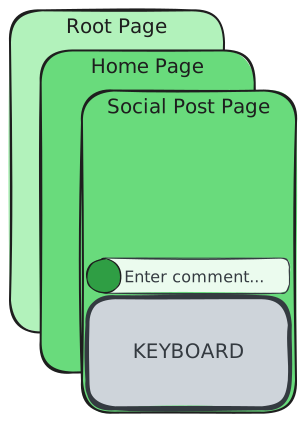 Visualization of nested page structure
So, we made a classic decision, refactor everything... We decided to rip out our routing entirely and replace it with auto_route. Since we didn't like the DX of go_router anyway we weren't just looking for a performance fix, we wanted a better, type-safe solution for routing, and thats exactly what auto_route offered. We spent nights and weekends for over a month refactoring the navigations.
Look at this beauty:
// This makes the widget into a route
@RoutePage()
class GolfclubSocialPostPage extends StatefulWidget {
  const GolfclubSocialPostPage({
	  // PathParam attribute marks these as required path parameters
	  @PathParam() required this.clubId,
	  @PathParam() required this.postId,
	  super.key
  });
  ...
}

// Navigate to the page like so:
context.navigateTo(
 	GolfclubSocialPostRoute(
		clubId: clubId,
		postId: postId,
 	),
);
The refactoring from go_router to auto_route was a varm welcome. The code was now cleaner, we had type-safe path parameters, and the routing was elegant and comprehensible. But the stutter remained. We hadn't found the ghost, we had just given it a nicer house to live in...
Replacing our entire navigation stack had yielded exactly zero performance gains. It was a humbling moment. If the routing wasn't causing the global rebuild, what was?
We went back to the drawing board and asked ourselves: What actually changes when a keyboard opens?
The answer seemed too simple: the screen dimensions. But in Flutter, a change in dimensions triggers a ripple effect through a specific, powerful, and often misunderstood tool: MediaQuery.
Read on in Chapter 2 where we had to dive into the Flutter internals to uncover how a single line of Theme data or a misplaced MediaQuery call can bring even the most robust app to its knees.